Building software with AI, specs, and OpenSpec
Agents, specs, and the OpenSpec change loop.
I have been keeping notes on coding agents, and on what still has to hold up in code review. Below are the main ways people code with AI today, as the sources describe them, followed by a closer look at spec-driven development and one tool for it, OpenSpec.
Paths, commands, and numbers come from the linked pages. The comparisons reflect the limits each source names. They are not measurements.
Seven ways to code with AI
Steve Yegge’s March 2025 essay treats vibe coding as an attitude: let the AI write. That attitude can apply to a chat or to an agent. Karpathy’s February 2025 description is a concrete loop, so it gets its own section. The other practices are autocomplete, chat-oriented programming, agentic coding, AI-assisted test-driven development, context engineering, and spec-driven development. In practice, people mix them.
Vibe coding
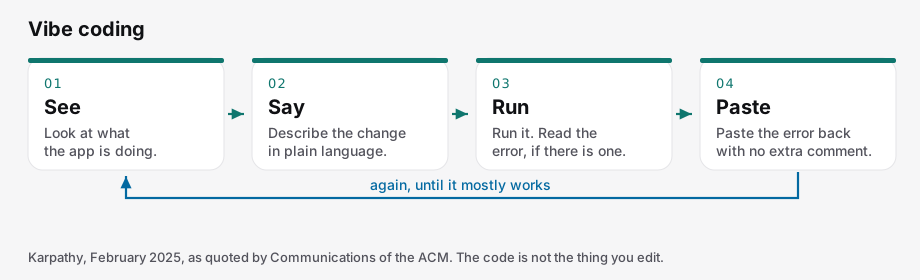
See, say, run, paste the error. PNG.
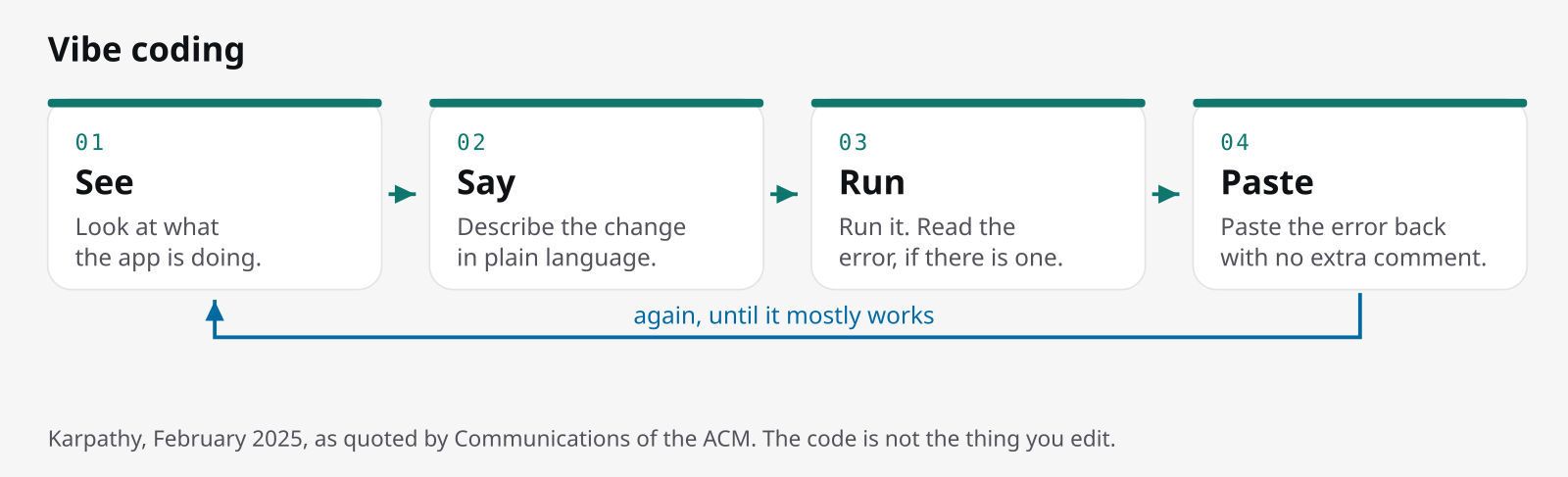
Karpathy’s line, quoted by Communications of the ACM in May 2025, is to give in to the vibes and forget that the code exists. He accepts every diff without reading it. The loop is: see, say, run, and paste any error back without comment. Over time, the code grows beyond what you can understand.
A 2025 study of vibe-coding sessions quotes the same post (“I Accept All always, I don’t read the diffs anymore”), but the sessions it observed were more careful than the slogan: prompt, quick scan, run, manual edit. The skill shifts to judgment: managing context, evaluating output, and knowing when to take the keyboard back.
The tools mentioned are Cursor, Replit, Windsurf, Bolt, and GitHub Copilot’s agent mode. A good fit is a weekend UI: describe the screen, run it, paste the stack trace. GitHub’s September 2025 Spec Kit post says vibe coding suits prototypes, not serious applications or existing codebases. Thoughtworks noted in November 2025 that the term was meant flippantly, and that complacency about generated code showed up quickly.
On a team, the problem is review. Nobody read the diff, and there is no lasting record of why the code looks the way it does. Once the chat is gone, maintainers have nothing to go on.
Pair programming (autocomplete)
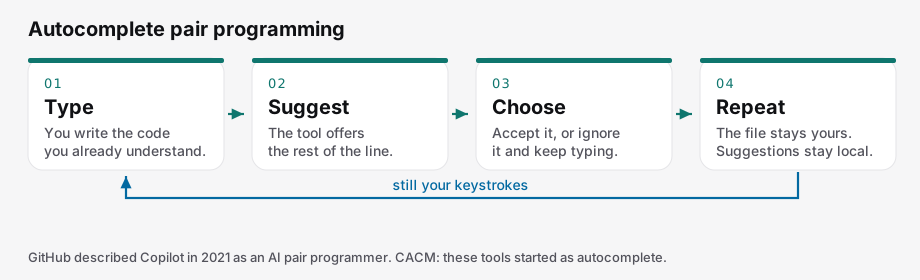
Type, get a suggestion, choose, repeat. The keystrokes stay yours. PNG.
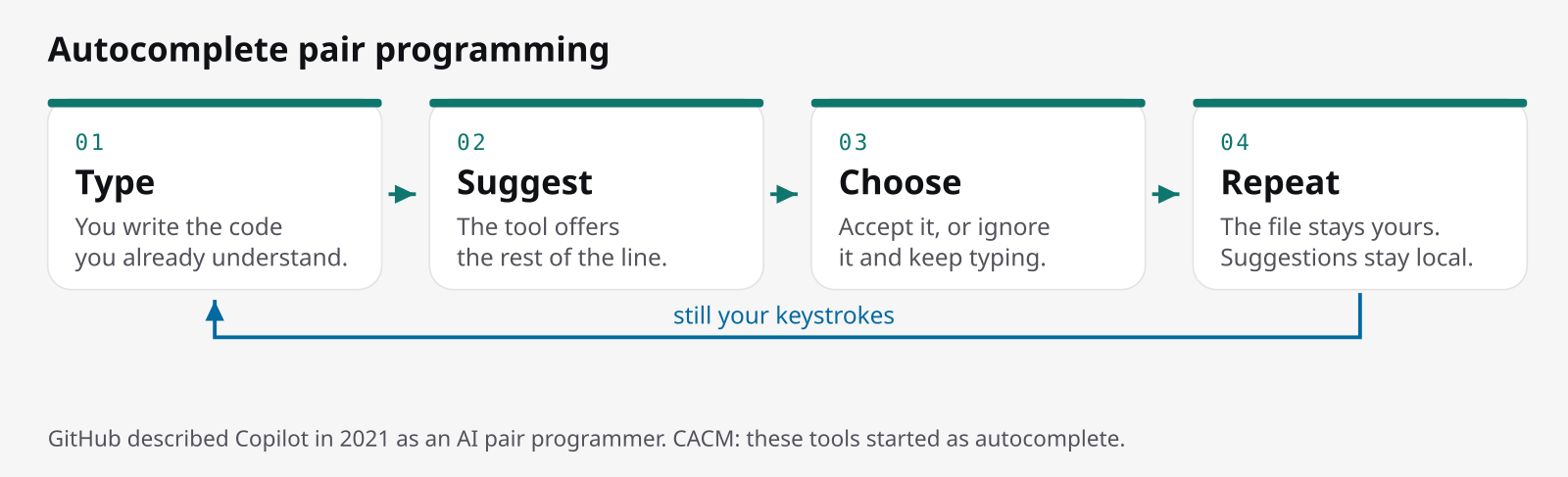
GitHub launched Copilot in 2021 as an “AI pair programmer.” Its June 2025 post treats the later agent mode and cloud coding agent as separate loops. CACM describes this first generation as autocomplete: the assistant finishes the line you are already writing.
You stay in control line by line: accept the suggestion or keep typing. It does not review a design or manage a change across a codebase, and team conventions remain your job. The common mistake is assuming that a later agent, one that opens pull requests, works the same way.
The same CACM piece summarizes a field experiment with about 5,000 developers at Microsoft, Accenture, and a Fortune 100 company. Copilot completions increased completed tasks by more than 25 percent. Less-experienced developers gained about 27 to 39 percent, and senior developers about 8 to 13 percent. That result applies to completions in that study, not to every codebase or to agents.
Chat-oriented programming
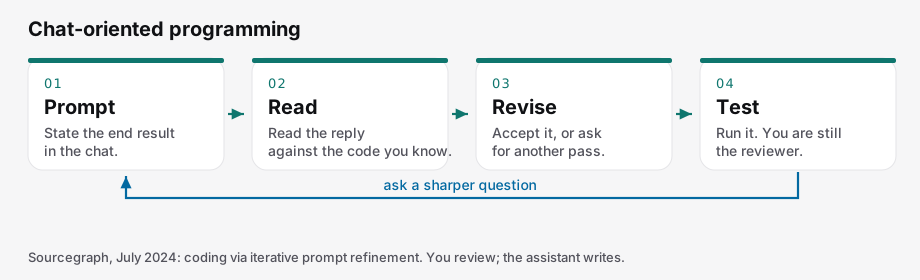
Prompt, read, revise, test, ask again. PNG.
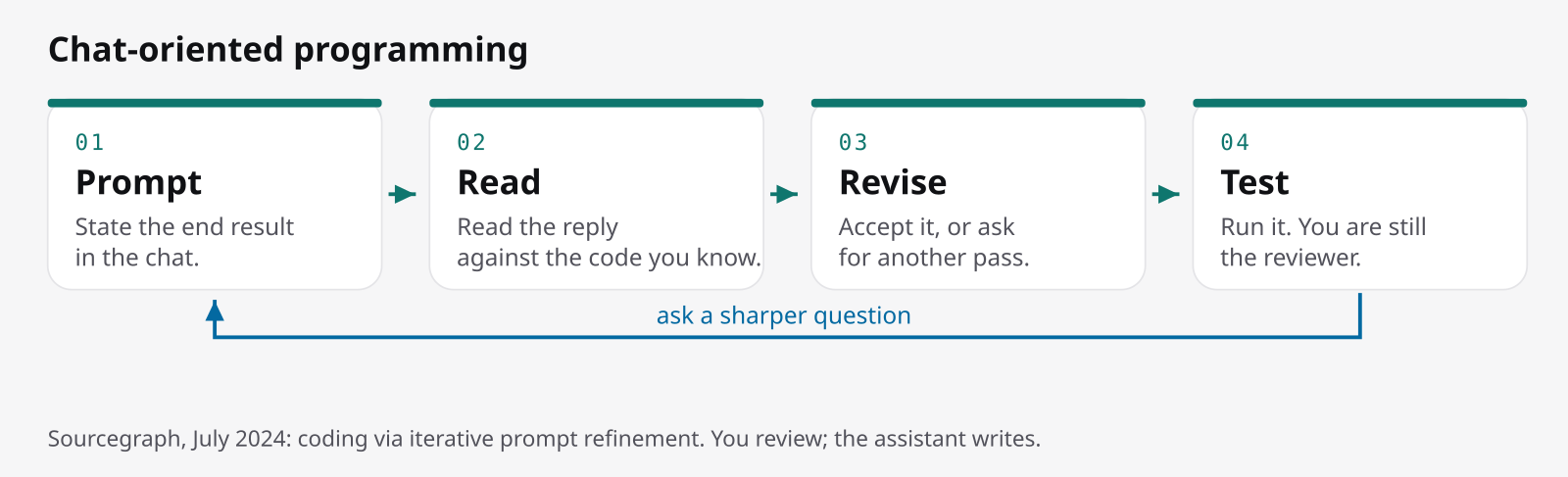
Sourcegraph, in July 2024, called this chat-oriented programming: coding by refining prompts. You request the change and review it, and the assistant writes it. Yegge calls it CHOP and separates it from agents, because with chat you check in on every turn.
Ado Kukic’s example is adding a model to the Cody VS Code extension: ask where models are defined, accept the in-editor edit, and ask again if the diff is wrong. Tests can act as a contract for correctness. You need to know the code well to spot a confident wrong answer. The tools named are Cody, plus the in-editor chats in Copilot, Cursor, Sourcegraph, and Windsurf. (Yegge’s productivity multiples are his own estimates and are not used here.)
This works for a change one person can describe and check in one sitting, then send through normal review. It breaks when the reviewer no longer knows the code well enough to catch mistakes, which on a large codebase is the norm. The model can be wrong in prose that reads as finished.
Agentic coding
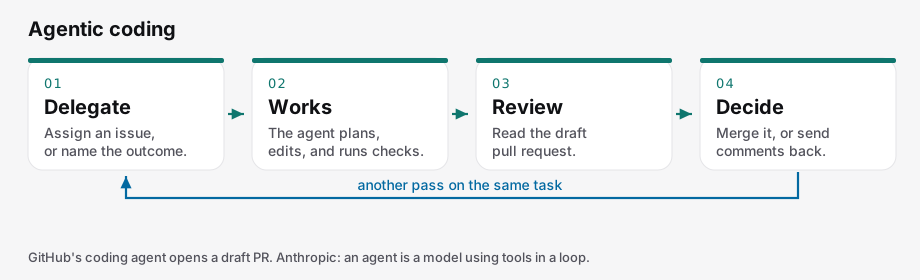
Delegate, let it work, review, then merge or send it back. PNG.
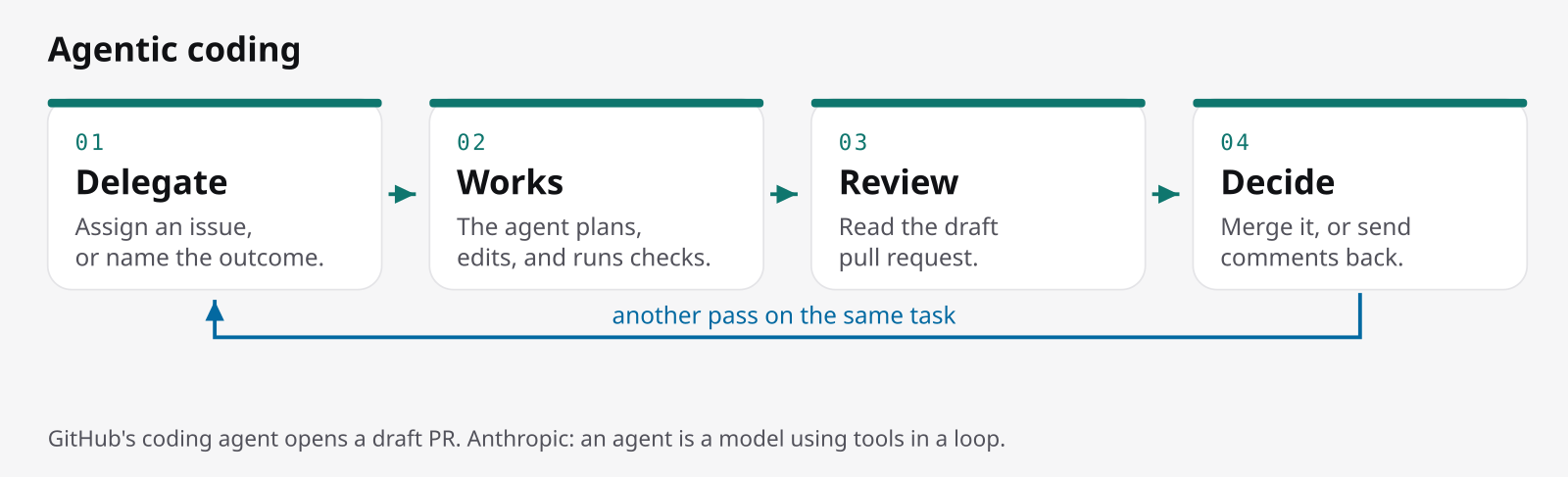
Anthropic’s December 2024 post, Building effective agents, separates a workflow, which follows a path written in advance, from an agent, which directs its own process and tools. Their September 2025 context post shortens this to “LLMs using tools in a loop.” (The December page now notes that the tooling has changed. The definitions here come from the original post.) Their advice: start with a prompt, and add an agent only when it clearly does better. Agents cost more, and their errors compound. A coding agent fits when tests can check the result, but a person still has to judge whether the change fits the rest of the system. Their example is SWE-bench tasks built from pull-request descriptions.
GitHub’s coding agent plugs into review and CI. You assign it an issue, or ask from Copilot Chat. It opens a draft pull request, pushes commits, and runs tests and linters if the repository has them. Mentioning @copilot sends it back for another pass. Branch protection still applies, CI waits for a person’s approval, and the agent cannot merge its own work. GitHub describes it as background work, with several issues in flight while you do other things. That is their framing, not a timed benchmark.
Claude Code is Anthropic’s agentic coding CLI. Boris Cherny’s April 2025 post says it is deliberately low-level and does not force one workflow. One community pattern is explore, plan, code, commit. The first two steps matter, because otherwise it jumps straight to code. That post is no longer maintained and points to the current Claude Code docs. The workflows here come from the April post.
Good fits are a scoped issue, bug, refactor, or test gap in a repo that already has review rules. The agent acts like a teammate who opens a draft pull request. It breaks when the task cannot be checked, when the sandbox is not trusted, or when reviewers cannot judge how the change fits the system. Anthropic warns about compounding errors. GitHub’s loop is built to stop a draft from being rubber-stamped.
AI-assisted TDD
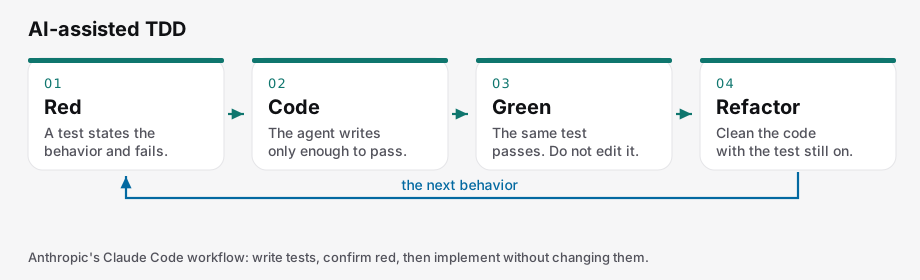
Red, code, green, refactor, then the next behavior. PNG.
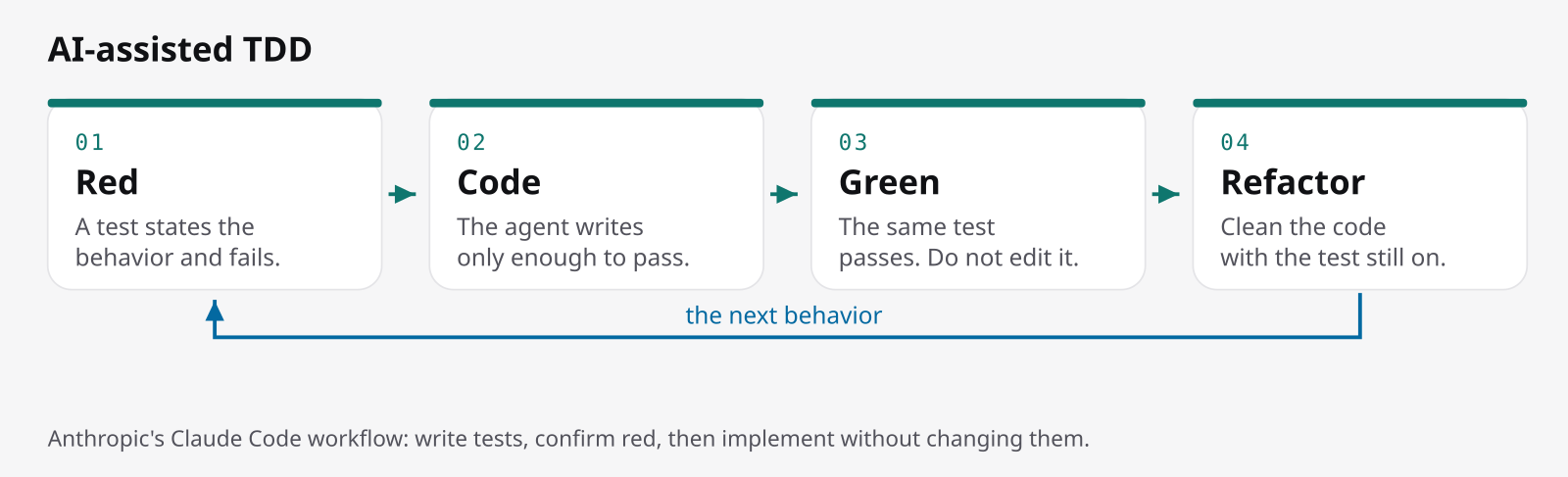
Martin Fowler’s bliki entry (first published 5 March 2005, updated December 2023) records Kent Beck’s steps: write a test list, write a failing test, make it pass, then refactor. Skipping the refactor is the usual way to do it badly. The test suite is what a team can review when a diff is too large to read line by line.
Using an agent does not settle who writes the tests. Anthropic’s Claude Code post suggests this for changes tests can check: have the agent write tests from input and output pairs, run them to confirm they fail, commit them, then implement without touching the tests until they pass. For example, a person writes three failing tests for a parser’s awkward cases, and the agent may only turn them green.
Thoughtworks, in February 2026, warns that if the agent writes the test after the code, the test can lock in the agent’s own bug. A human-written test is a target the agent cannot quietly move. Birgitta Böckeler’s exploratory study compared three setups: a person writes the tests, a person reviews the failing test before implementation, or the agent runs the whole red-green loop. On small greenfield business-logic tasks, with Sonnet 4.6 generating and Opus 4.8 judging, the fully agent-run loop showed no clear quality win, and none of the runs followed TDD perfectly. The sample was small. It is not a benchmark.
TDD fits behavior you can state as a failing test up front. The strongest control is a human-written test the agent cannot edit. It breaks when the agent is allowed to change tests to reach green, or when the refactor is skipped and the suite ends up blessing a mess.
Context engineering
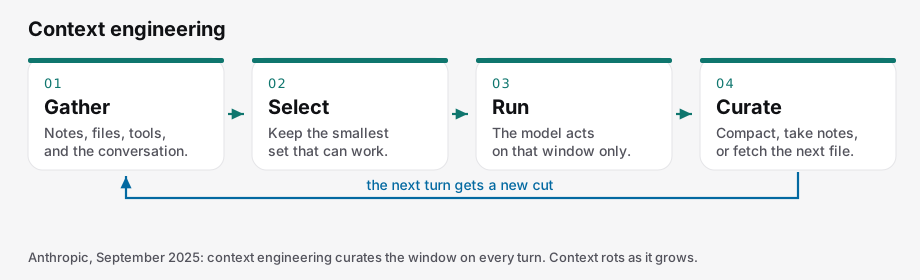
Gather, select, run, then trim for the next turn. PNG.
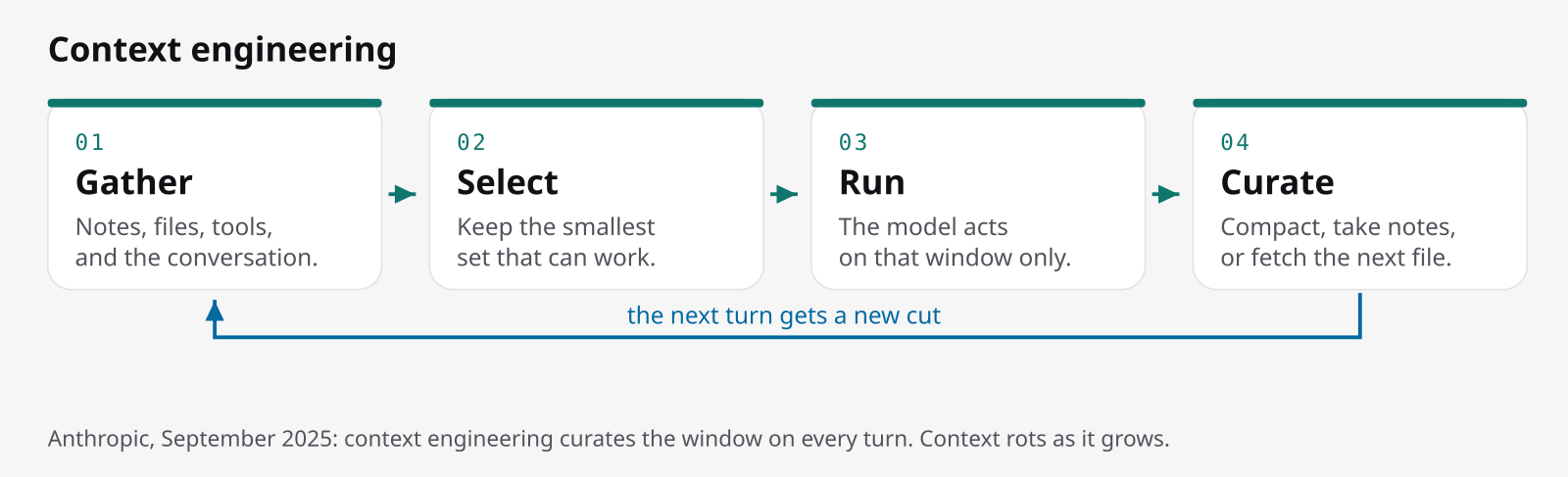
Anthropic’s Effective context engineering for AI agents (29 September 2025) frames the next question after prompt engineering: which context is most likely to produce the behavior you want? Context is every token in the call, not only the prompt. Attention cost grows with the square of the token count, and recall gets worse as the window fills. They call that context rot. System prompts should sit at a “Goldilocks altitude”: too vague and the model wanders, too prescriptive and it becomes brittle.
The practice is to curate on every turn and keep the smallest high-signal set. For long tasks they describe compaction (summarize and restart), notes kept outside the window, and sub-agents that return a short result of around one or two thousand tokens. Fetching just in time is slower than a prepared index, and an agent can waste its window on a dead end. Claude Code, in that post, loads CLAUDE.md up front and searches for files as it needs them.
Thoughtworks’ November 2025 piece describes the move away from vibe coding and stresses that humans still need the context too. It names agents.md, Context7, Mem0, the Model Context Protocol, and agent-to-agent protocols, and says it is too early to know which standards will win. OpenSpec’s README puts the same hygiene in one line: clear the context before implementation.
This matters for long sessions and for any prompt that would otherwise paste in a whole repository. A checked-in notes file is how a team shares it. On a large codebase, the failure is dumping everything in, or a fetch loop that fills the window before the change is even specified. A focused window beats a dumped tree, though fetching every fact on demand slows things down.
Spec-driven development
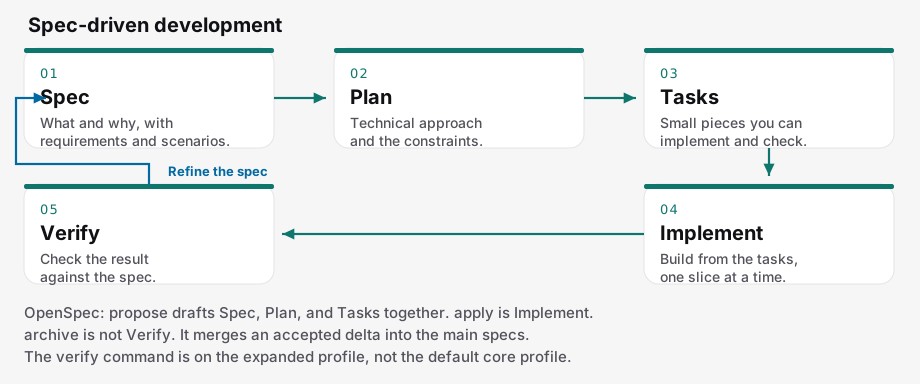
Spec, plan, tasks, implement, verify, then back to the spec. PNG. The full cycle is covered further down.
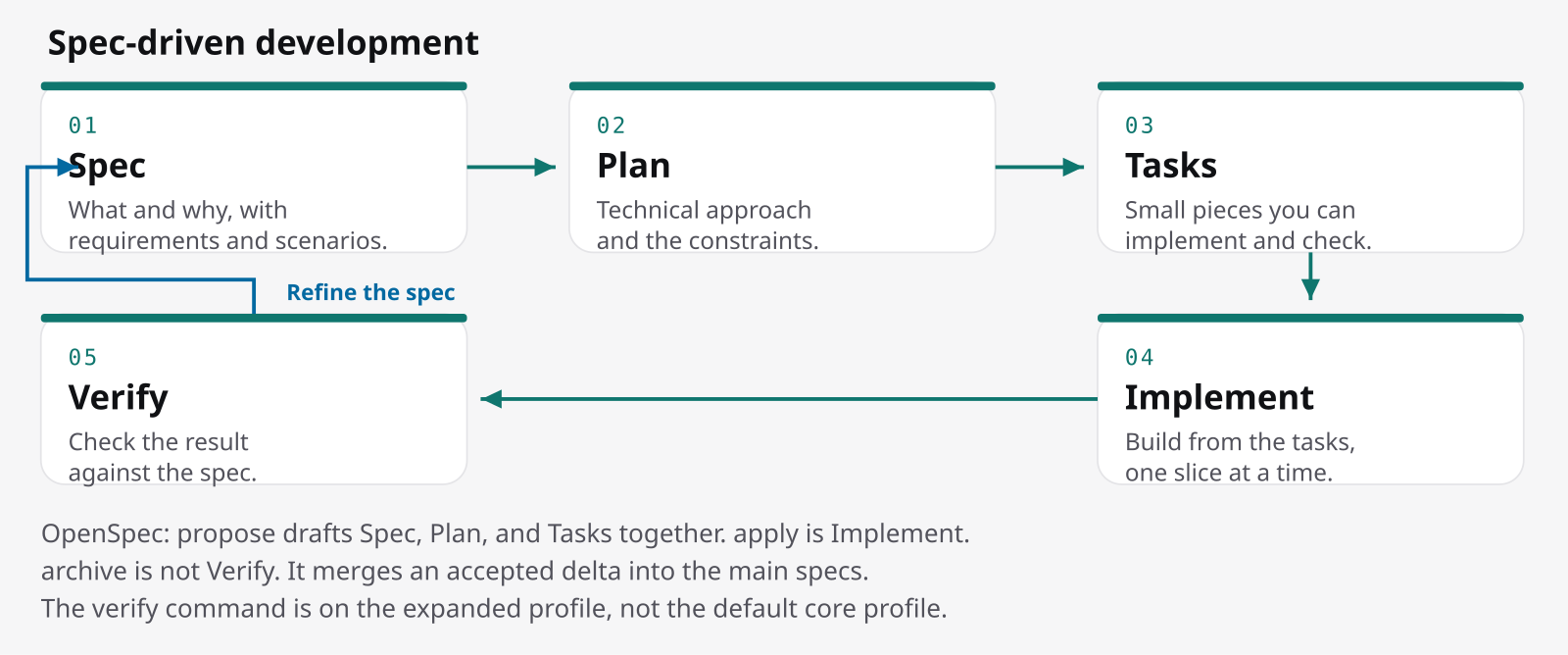
GitHub (2 September 2025) says to start from a spec, a contract for how the code should behave, and to treat it as the source of truth for both people and agents. Böckeler’s Understanding Spec-Driven-Development (15 October 2025) defines a spec as a structured, behavior-focused document, written in natural language, that guides the agent. A rules file, a memory bank, or a CLAUDE.md is different: it gives context to every session, while a spec describes the behavior of one feature. Mixing the two up is how a rules file ends up treated as a specification.
GitHub’s example of the failure is a prompt like “add photo sharing.” A spec says who shares, what success looks like, and what must not happen. The plan names the stack. Tasks are small enough to review. As the same post puts it, models are exceptional at pattern completion, not at mind reading. The tools covered below are GitHub Spec Kit, OpenSpec, and Kiro. Spec-driven development fits when the behavior has to outlive the chat history. OpenSpec’s README makes the same point: assistants are unpredictable when requirements live only in chat.
Comparing the approaches
How the sources describe each approach:
| Approach | Control | Pace of the loop | What reliability depends on | Best fit | Team scale |
|---|---|---|---|---|---|
| Vibe coding | Low on purpose. Karpathy accepts the diff without reading it. | Short. See, say, run, paste. | “Mostly works.” GitHub finds it weak for serious apps and existing systems. The code can outgrow your understanding. | Throwaway prototypes and side projects. | One person. Shared code has no lasting “why.” |
| Pair programming | High. You see each suggestion and keep typing if it is wrong. | Line by line, in the file you have open. | You still read every line. It does not review a whole design. | Code you are writing yourself and can judge instantly. | One editor. Team conventions stay with you. |
| Chat-oriented | You accept the reply or ask again. Kukic: you are the reviewer. | One conversation. You wait on each reply. | You can only catch what you still understand. The model can be wrong in fluent prose. | A change you can describe and check in one sitting. | One author, then normal review. |
| Agentic coding | You delegate, then review. GitHub: branch rules and human approval still apply. | Background. Several issues at once while you do other work. | Tests check behavior. Anthropic: errors can compound, and review still has to judge the wider system. | A scoped issue, bug, refactor, or test gap. | A repo with review rules. The agent acts like a teammate opening a draft pull request. |
| AI-assisted TDD | Highest when a person writes the failing test and freezes it. | Extra red and green steps per behavior. | Thoughtworks: an agent-written test can lock in a bug. Böckeler: agent-run TDD was not clearly better in her small study. | Behavior you can state as a failing test first. | The suite becomes the contract the team reviews. |
| Context engineering | You choose what enters the window, or set the rules for fetching. | Just-in-time fetching is slower than a prepared index. | Anthropic: recall drops as the window fills. A focused window beats a dumped repository. | Long agent sessions, and any prompt that would otherwise paste in the repo. | Shared notes such as CLAUDE.md, checked in. |
| Spec-driven | You accept the spec before any code. GitHub: each phase is a checkpoint. | Planning documents before code. Böckeler found the tools too heavy for a small bug. | Agents still skip instructions. The spec only helps if someone reads it. | A feature whose behavior must outlive the chat. GitHub names greenfield work, features in existing systems, and legacy rebuilds. | Specs can be shared. OpenSpec stores (beta) are a separate planning repo for several code repos. |
“Too heavy for a small bug” comes from Böckeler’s own experience. One bug in Kiro turned into 4 user stories and 16 acceptance criteria, and Spec Kit was too verbose for a feature she would have sized at 3 to 5 points. OpenSpec pitches itself as lighter, with no rigid phase gates. Both can be true, since they are different tools.
Where things are heading
These are dated claims, not a forecast:
- GitHub, June 2025: Copilot moves from the 2021 pair programmer to agents that plan, edit, and test, with a person still able to interrupt.
- Anthropic, December 2024: start with a prompt, and add an agent only when it beats the simple version.
- Anthropic, September 2025: curate context on every turn. Smarter models need less prescription, but the window is still finite.
- GitHub, September 2025: intent becomes the source of truth, specs become executable, and code is the last mile.
- Böckeler, October 2025: the word “spec” is already fuzzy, and sometimes people just mean a long prompt. Spec-as-source, in her reading, resembles model-driven development, with its inflexibility combined with the model’s non-determinism.
- Thoughtworks, November 2025: a shift from vibes toward context, with humans still critical.
- Thoughtworks, February 2026: review effort moves toward specs, tests, types, risk, and ongoing understanding. Writing English and deleting the code is not where that piece says things are going.
Yegge’s March 2025 timeline for fleets of agents is a prediction, and is not treated as fact here.
My own reading, not taken from any source: use the lightest loop that still includes a check, and write a test, a spec, or both when the change will need to be maintained.
Three levels of spec-driven development
Böckeler separates three levels. Her notes come from using the tools in September 2025, and she warns that they were changing fast, so her account of Tessl should not be assumed to hold after that date.
- Spec-first: write a spec, then use it for the task in front of you. Every approach she found does at least this.
- Spec-anchored: keep the spec and edit it when the feature changes. OpenSpec’s archive step is built for this: deltas merge into
openspec/specs. - Spec-as-source: people edit only the spec. Code is generated and never edited by hand. She saw this explored in the Tessl Framework, then in private beta, with a one-to-one mapping from spec to file, a “generated from spec” comment, and regeneration that did not always produce the same code.
At the time, she saw Spec Kit as spec-first for the life of a change, not spec-anchored for the life of a feature, because each spec lived on a branch. Spec Kit’s current concepts page does not say how teams should keep spec.md up to date after requirements change. Kiro, in her reading, was spec-first inside its editor. OpenSpec is the one tool here that documents merging change deltas back into a lasting specs directory. That is the key maintainability difference: a spec that dies with its branch cannot guide the next change.
The spec-driven cycle
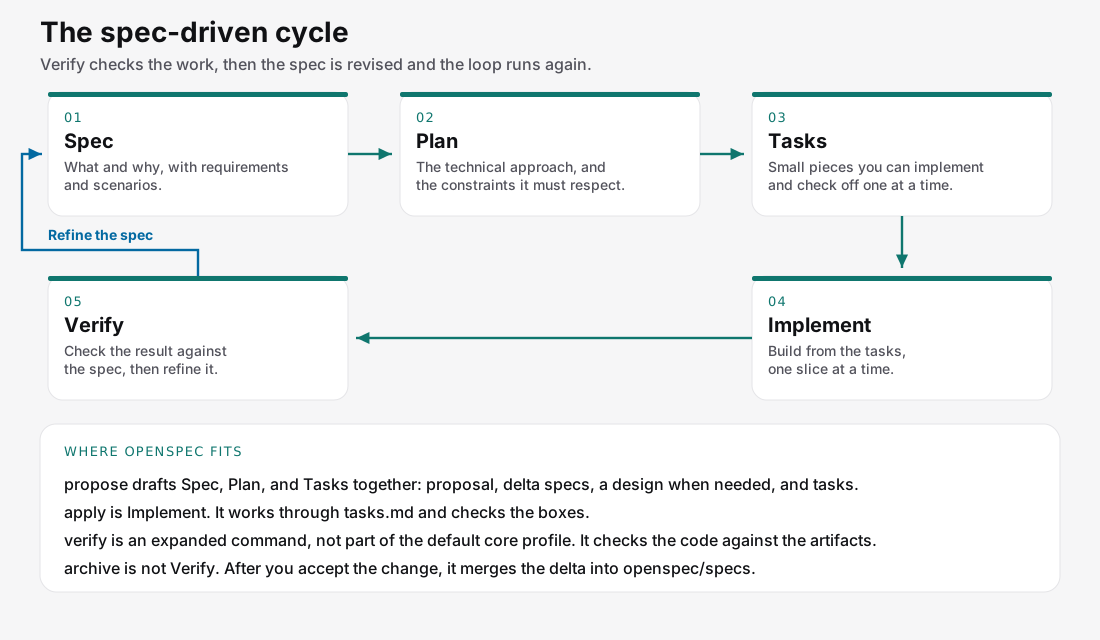
Spec, plan, tasks, implement, verify, then refine the spec. SVG. PNG.
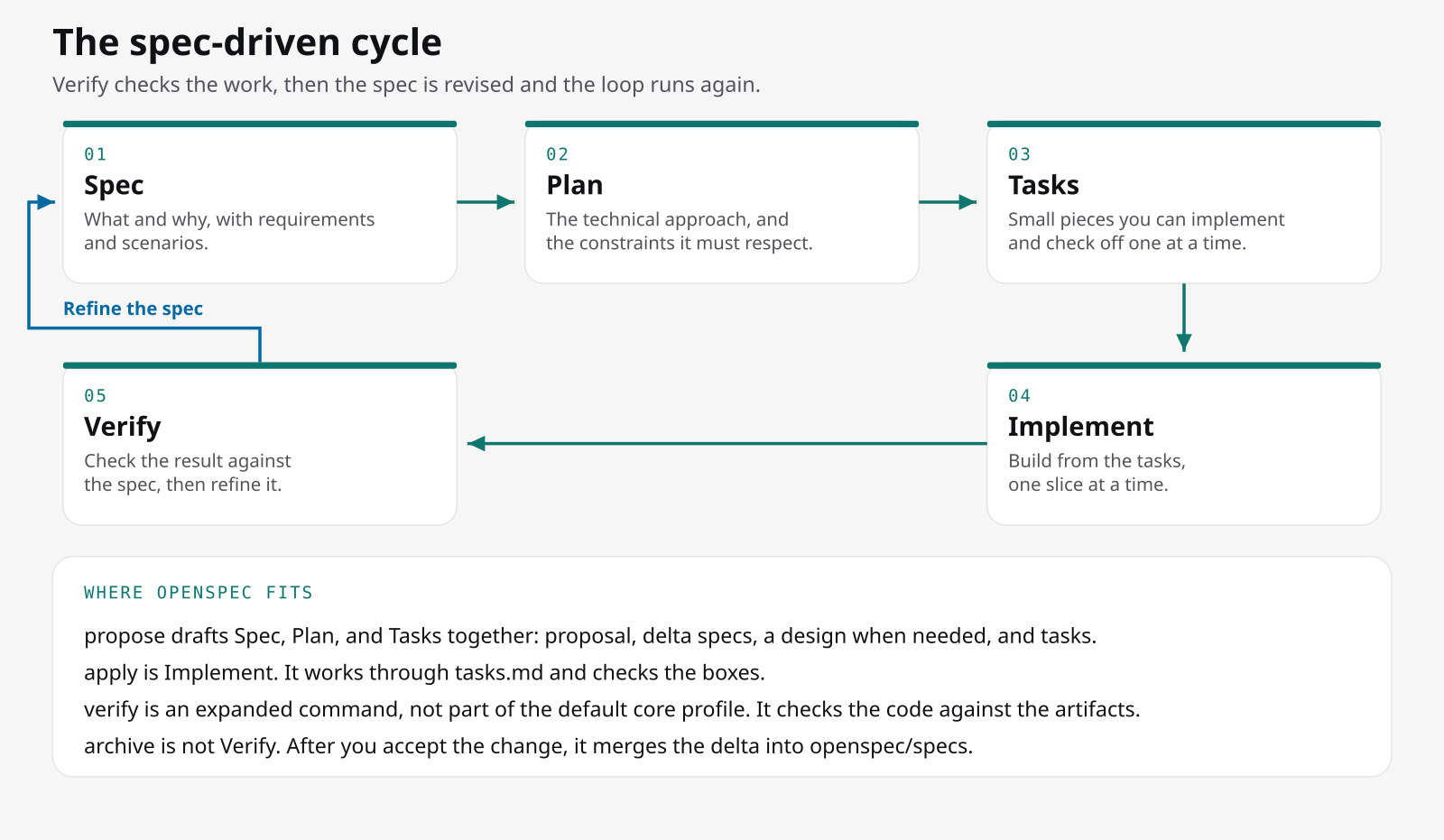
GitHub’s blog names four phases and says the job at each one is to verify. The diagram adds the arrow back to the start, because a wrong spec is fixed by editing the spec and generating again.
- Spec: the what and the why. Who uses it, what problem it solves, and what success looks like. User journeys and outcomes, not the tech stack.
- Plan: the how. Stack, architecture, constraints, legacy systems, and compliance. More than one plan is allowed.
- Tasks: small enough to implement and check. GitHub’s example of the right size is “create a user registration endpoint that validates email format,” not “build authentication.”
- Implement: one task at a time, so review covers that one change, not a thousand-line dump.
- Verify: if the spec turns out to be wrong, change the spec.
How OpenSpec maps onto the cycle
The five names on the diagram describe the loop. They are not OpenSpec’s command names, so read the note on the diagram before using it as a command map.
proposedrafts the proposal, the delta specs, a design when the change needs one, and the tasks. That covers spec, plan, and tasks together, which is how OpenSpec can call itself “fluid not rigid” and still have artifacts.applyis implementation. Progress is tracked by the checkboxes intasks.md.verifyis not in the default core profile.archivemerges an accepted delta into the lasting specs and moves the change folder. This is how the specs learn what shipped. Checking the code is a separate step.
A person reviews the plan before apply. If the plan turns out wrong partway through, the quickstart says to fix the artifacts and keep applying.
Spec Kit in practice
Spec Kit’s September 2025 blog post used /specify, /plan, and /tasks, installed with uvx from the git URL. The current README is different:
- Run
/speckit-constitutiononce, then/speckit-specify,/speckit-plan,/speckit-tasks,/speckit-implement, and/speckit-converge. Repeat implement and converge until it reportsConverged. A longer path adds clarify, checklist, and analyze. - These commands run in the agent’s chat, not in the terminal. Copilot uses the slash form by default. Other agents spell it differently, and the README points to an integrations page.
- Install with
uv tool install specify-cli, then runspecify init. It needs Python 3.11+ and uv. - The active feature is tracked in
.specify/feature.json, which you can override withSPECIFY_FEATURE_DIRECTORY. Git is not required. A git extension adds numbered branches, but checking out a branch alone does not switch the active feature.
The concepts page also distinguishes greenfield, creative exploration, and brownfield work, and points to contract-driven development when a component has external consumers.
Specs compared with TDD and BDD
| What you write first | What done means | |
|---|---|---|
| Plain prompting | A chat message. GitHub’s example of the failure is “add photo sharing to my app.” | Whatever the model assumed. A wrong assumption often shows up late. |
| TDD | An executable test, then code, then a refactor. The test list comes before the first red bar. | The test passes, and the structure is cleaned up. |
| BDD | A sentence describing behavior. Dan North, in September 2006, replaced the word “test” because it caused confusion, and built JBehave around “should.” | The system shows the behavior you named. In a later essay he describes scenarios as givens, events, and outcomes, in the language of the business. |
| Spec-driven | A natural-language behavior spec shared by the agent and the person, then a plan and tasks. | The implementation matches the spec, and the spec is what you change when the intent changes. |
Comparisons with TDD and BDD are common. Böckeler adds that spec-as-source should also be compared with model-driven development.
Scenario formats are not all the same:
- OpenSpec’s schema template, which
openspec validatechecks against, uses WHEN / THEN under a requirement that says SHALL or MUST. OpenSpec’s concepts doc also shows GIVEN / WHEN / THEN / AND, but the schema form is the one to use. - Kiro’s current requirements-first docs use EARS: WHEN … THE SYSTEM SHALL. Böckeler saw GIVEN / WHEN / THEN in Kiro in September 2025.
North’s essays are about behavior, not about OpenSpec’s formatting rules: Introducing BDD (20 September 2006) and BDD with intent.
OpenSpec
What it is
OpenSpec is a spec framework from Fission. Its README sums up the philosophy in five lines: fluid not rigid, iterative not waterfall, easy not complex, built for brownfield and not only greenfield, and scalable from personal projects to enterprises. The concepts doc explains the first four. “Fluid” means there are no phase gates: any artifact can be updated at any time.
The README contrasts OpenSpec with Spec Kit, which it calls heavier, with rigid gates and a Python setup, and with Kiro, which it describes as locked to its IDE and to Claude. Kiro’s own docs now list IDE, CLI, and Web, so treat that as OpenSpec’s framing, not Kiro’s current feature list. The comparison table further down uses each project’s own docs.
The published site no longer serves the old concepts and slash-command URLs. The repository copies and the skills page are the ones that still work.
Why deltas
Deltas let a change describe a modification to a system that already exists. The concepts doc lists their benefits: clarity, fewer conflicts, reviewing only what changed rather than the unchanged text, and a natural fit for brownfield work. Two changes can touch the same spec as long as they touch different requirements. That is the governance benefit: reviewers read the delta, while a full restatement would hide the change and collide with the next branch.
Project layout
After openspec init, the project has openspec/config.yaml, a specs/ directory for current behavior, and a changes/ directory with one folder per proposed change plus an archive/ folder. specs/ is the source of truth, organized by domain. This layout comes from the setup and spec-driven schema docs.
openspec/
├── config.yaml
├── specs/                 # current behavior
│   └── auth/spec.md
└── changes/
    ├── add-dark-mode/
    │   ├── proposal.md
    │   ├── design.md
    │   ├── tasks.md
    │   └── specs/         # the delta
└── archive/config.yamlholds project settings and context for the agent.- The schema’s drafting order is: proposal first, then specs and design in either order, then tasks, then apply. Design can be skipped when none of its conditions apply.
- A change with no behavior change sets
skip_specs: truein.openspec.yaml. Without that marker,openspec validaterejects a change that has no deltas. - For a feature that spans more than one code repository, stores (beta) provide a separate planning repo with the same
openspec/layout, shared through git.
Installing
Per the README, install with the binary install script, with npm install -g @fission-ai/openspec@latest on Node.js 20.19.0 or newer, or with brew install openspec. pnpm, yarn, bun, and Nix also work.
openspec updaterefreshes the instruction files inside a project.openspec installupgrades the standalone CLI.
The README recommends Codex 5.5 and Opus 4.7 for planning and implementation. That is the project’s recommendation, not a measured result. It also says to clear the context before implementation.
The basic workflow
The quickstart has five steps, all run in the agent’s chat:
- Explore (optional, for when the idea is still fuzzy). It reads the code and writes nothing unless asked.
- Propose. It drafts the plan and stops.
- Review. A person reads
proposal.md, thenspecs/, thentasks.md, before any code is written. - Apply. It works through
tasks.md, checking off boxes. A fresh chat is recommended, because implementation goes better with a clean window. If it stops, ask again and it resumes at the first unchecked box. - Archive. Once all boxes are checked, the specs absorb the change and the folder moves to
changes/archive/with a date prefix.
Profiles
The default core profile includes explore, propose, apply, update, sync, and archive. Running openspec config profile and then openspec update unlocks the expanded set: new, continue, ff, verify, bulk-archive, and onboard. The profile setting is global per machine, and other projects pick it up on their next openspec update.
verify checks that the implementation matches the artifacts. It changes nothing and does not archive. Turn it on if you want that check before archiving.
CLI and chat commands
openspec init --tools cursor
openspec new change add-dark-mode
openspec status --change add-dark-mode
openspec validate
openspec archive add-dark-mode -y
/opsx:propose add-dark-mode
/opsx:apply
/opsx:archiveThings worth knowing about the CLI:
openspec new changeonly creates.openspec.yaml, with the schema and the creation date. It does not write the four artifacts.openspec status --changetells you the next artifact to write. Tasks stay blocked until specs and design exist. Once planning is done, it points you toopenspec instructions apply.openspec archivewithout a name prompts you, and outside a terminal it exits with code 1.-yanswers the confirmations.--skip-specsarchives without touching the main specs. Declining the spec update also archives and leaves the specs alone.- A validation failure blocks archiving unless you pass
--no-validate. Incomplete tasks only trigger a warning, and-ycontinues anyway. /opsx:syncmerges delta specs into the main specs without moving the folder.openspec archivedoes both.- OpenSpec does not handle Git. Commit the change folder together with the code.
- OpenSpec does not prune the archive. If Git is your history, you can delete an archived change’s
specs/once the merge is committed. openspec validate --archivedchecks task completion, not whether the deltas were applied.
Command names in different tools
The README lists 30+ supported tools, and openspec init prints the right spelling for yours. The canonical chat command is /opsx:propose:
- Claude Code uses the colon form,
/opsx:propose. - Cursor and GitHub Copilot use
/opsx-propose. - Codex uses
$openspec-propose. - Amazon Q, per the README, uses
@opsx-propose.
The same workflows also install as skills, for example /openspec-apply-change. Skills and commands carry the same instructions. The docs prefer skills and expect commands to be retired later. The skills page has the published list, and the slash-command writeup lives in the repository.
openspec init asks which tools to set up. --tools cursor,claude skips the picker, and --tools none writes only the OpenSpec folder. Restart the editor after init. Re-running init prints “Refreshed” for tools that are already set up. The setup doc’s example output is “Created: Claude Code / 6 skills and 6 commands.” If Claude Code does not list the commands, the setup doc says to run openspec update, and if needed openspec config set delivery both.
| Tool | What you type for apply | Where init writes |
|---|---|---|
| Cursor | /opsx-apply or the skill /openspec-apply-change | .cursor/commands/ and .cursor/skills/ |
| Claude Code | /opsx:apply or /openspec-apply-change | .claude/commands/opsx/ and .claude/skills/ |
| GitHub Copilot | /opsx-apply or the skill form | .github/prompts/ and .github/skills/ |
| Codex | $openspec-apply-change. Commands are not generated. | .agents/skills/ |
Propose, explore, archive, and the rest follow the same pattern. The full matrix is on the supported-tools page.
Example: adding dark mode with OpenSpec
The README’s “see it in action” transcript runs /opsx:explore, /opsx:propose add-dark-mode, /opsx:apply, and /opsx:archive, and shows the archive landing at openspec/changes/archive/2025-01-23-add-dark-mode. The transcript is illustrative: the assistant replies are the project’s demo, not a guaranteed session.
The proposal and delta below are my own study text, written in the documented template. They are not files from the OpenSpec repository. The dark-mode story and the requirement sentence come from the README. The Purpose line is mine, written long enough for a new capability.
The proposal
# Proposal

## Why
The app has a single theme. People using it at night have asked for a dark one.

## What Changes
- Add a theme control that follows the system preference until a person chooses.

## Capabilities
### New Capabilities
- ui: theme selection for the application shell

### Modified Capabilities

## Impact
Styling and a small piece of client state. No new dependency.
The template’s sections are Why, What Changes, Capabilities, and Impact. Some tips:
- Each capability name becomes
specs/<capability-path>/spec.md. The Capabilities section is the contract with the specs phase. - Before filling it in, run
openspec list --specs, thenopenspec showfor related specs. Plainopenspec listshows in-flight changes, not the list of capabilities. - New capabilities use kebab-case path segments. Modified capabilities must be existing paths whose requirements change, not just whose code changes.
- Implementation detail belongs in
design.md. - Mark breaking changes with BREAKING under What Changes.
- Keep the proposal to about one or two pages.
The spec delta
# Spec Delta

## Purpose
Lets a person choose a light or dark theme and keep that choice on this device.

## ADDED Requirements

### Requirement: Theme selection
The app SHALL let users switch between light and dark themes,
defaulting to the system preference.

#### Scenario: User toggles dark mode
- **WHEN** the user clicks the theme toggle
- **THEN** the app switches to dark mode and persists the choice
A new capability needs a Purpose, which archive copies into the new main spec. Leave it out and the main spec gets a TBD placeholder. A delta for an existing capability must not add a new Purpose. Edit the main spec’s Purpose directly instead, since the concepts doc ignores a Purpose on an existing spec.
Delta rules
Besides ADDED, a delta can use MODIFIED, REMOVED, and RENAMED:
- MODIFIED: paste the entire existing requirement, then edit it. A partial paste loses detail on archive, because the whole block with the matching header gets replaced.
- REMOVED: include a Reason and a Migration.
- RENAMED: use FROM and TO.
Formatting rules:
- Scenarios use exactly four hashes (
####). Three hashes fail silently. - Every requirement needs at least one scenario.
- Normative lines use SHALL or MUST.
openspec validatechecks the structure.--strictalso fails a requirement description over 500 characters and a Purpose under 50.
What archive does
On archive, ADDED requirements are appended, MODIFIED ones replace the requirement with the matching header, and REMOVED ones are deleted. Removing a capability’s last requirement deletes its spec.md only if the change sets retire_capabilities: true. Otherwise, archive aborts. Delta sections in files other than specs/<capability>/spec.md are not merged.
Before archiving, openspec/specs does not mention the theme yet, because the delta lives inside the change folder. After archiving, the main specs are updated and the whole change folder, delta included, moves under changes/archive/ with a date prefix. The docs use two example names for the same pattern: the quickstart’s pictures use add-rate-limiting, and a sample CLI transcript reports Change 'add-rate-limit' archived as '2026-08-11-add-rate-limit'.
OpenSpec, Spec Kit, and Kiro side by side
| OpenSpec | Spec Kit | Kiro | |
|---|---|---|---|
| Start | openspec init | specify init with an integration | Create a spec in Kiro’s pane, CLI, or web |
| Default flow | explore, propose, apply, archive | constitution once, then specify, plan, tasks, implement, converge | requirements or bug analysis, design, tasks |
| Files | openspec/specs and openspec/changes | Feature state under the directory in .specify/feature.json | requirements.md, design.md, tasks.md in .kiro/specs/ |
| Behavior language | SHALL / MUST, WHEN / THEN scenarios | Specify covers what and why. The plan is where the stack goes. | Current docs: EARS, WHEN … THE SYSTEM SHALL. Also bugfix specs and Quick Spec. |
| After the change | Archive merges the delta into the main specs. | The concepts page does not say how to keep spec.md afterward. | Three files per spec. The docs shown here do not describe a cross-feature merge. |
Böckeler’s October 2025 article is the published comparison of Kiro, Spec Kit, and Tessl. Use it for the three levels, and use each project’s current docs for commands.
Kiro’s specs docs describe feature specs, bugfix specs, Quick Spec, and parallel task execution across IDE, CLI, and Web. Correctness checking through property-based testing is IDE only. Requirements analysis is available in the IDE and CLI. Quick Spec asks clarifying questions, then generates all three files with no approval gates. Requirements-first is for when the behavior is known and the design can flex. Tasks can run one at a time or all at once. Parallel execution builds a dependency graph and runs independent tasks in waves.
When specs help, and when they don’t
Where they pay off
A spec pays off when the person and the agent agree before any code is written. GitHub names three cases: greenfield work, a feature in a system that already exists, and a legacy rebuild where the original intent has been lost. Brownfield edits suit deltas, because the delta shows exactly what changes. Security, compliance, and design-system rules get a place the agent will actually read. The spec lives in the repo, is reviewed along with the plan, and is merged back into openspec/specs when the change ships.
Where they fall short
Specs can be a sledgehammer. In one Kiro run, Böckeler got 4 user stories and 16 acceptance criteria for a single bug. A modest feature can produce a pile of markdown she would rather have reviewed as code. In one Spec Kit run, the agent ignored research notes and regenerated classes that already existed. A larger context window does not mean the agent uses everything in it, and that creates a false sense of control. Spec-as-source, if it inherits both the overhead of model-driven development and the model’s non-determinism, can make things worse while trying to improve them. Her word for this is Verschlimmbesserung. She also asks who these workflows are for: the demos assume a developer writes the user stories, which may be the wrong person for a large, unclear feature. Still, she concludes that spec-first is valuable, even though the term has become vague.
For a refactor, a tooling change, or a docs-only change with no behavior change, OpenSpec’s escape hatch is skip_specs: true. Do not invent a requirement just to make validation pass. That is exactly what the marker exists to prevent.
Putting it together
Anthropic’s December 2024 advice applies throughout: add machinery only when the simpler option is not enough. The options range from a line suggestion, to a chat edit, to an agent with a draft pull request, to a failing test, to a spec. For a long session, keep a short CLAUDE.md rather than pasting the repository into the prompt.
When a change does call for OpenSpec:
- Install it from the README, run
openspec init --tools cursor(orclaude, or use the picker), and restart the editor. - Explore, or run
/opsx:proposewith a kebab-case name. In Cursor, that is/opsx-propose. - Read the proposal, then the specs, then the tasks, and edit the markdown before any code is written.
- Start a new chat and run apply. If it stops, run apply again. It resumes at the first unchecked task.
- Run
openspec validate, then archive, and commit the spec together with the code.
For a pure refactor, set skip_specs: true. Switch to the expanded profile if you want /opsx:verify before archiving.
Sources
OpenSpec
- Repository and README
- openspec.dev
- Quickstart
- Setup
- CLI
- Slash commands (in the repo)
- Skills
- Supported tools
- Spec-driven schema
- Concepts (in the repo)
Spec Kit and Kiro
- Spec Kit repository
- What SDD is
- GitHub Blog, 2 September 2025
- Kiro specs
- Kiro requirements-first
- Kiro Quick Spec
Essays
- Böckeler on spec-driven development, 15 October 2025
- Böckeler on TDD in the agent loop
- Fowler, Test-Driven Development
- Dan North, Introducing BDD, 2006
- Dan North, BDD with intent
Vibe coding, agents, tests, and context
- CACM, Catching the Vibe of Vibe Coding, 6 May 2025
- arXiv:2506.23253
- GitHub, from pair to peer, 25 June 2025
- GitHub, meet the coding agent
- GitHub, coding agent 101
- Sourcegraph, chat-oriented programming, 27 July 2024
- Yegge, Revenge of the junior developer, 22 March 2025
- Anthropic, Building effective agents, 19 December 2024
- Anthropic, context engineering, 29 September 2025
- Anthropic, Claude Code best practices, 18 April 2025
- Claude Code docs, current best practices
- Thoughtworks, from vibe coding to context engineering, 5 November 2025
- Thoughtworks, Where does the rigor go?, 20 February 2026
Diagrams
- The spec-driven cycle
- The approach diagrams, each with a PNG beside the SVG